STBIBO Player for supported devices
STBIBO Player Activation
Activate the STBIBO application on one supported device with a 12-month or lifetime license. Install the correct app and test it with your own playlist before purchasing. The license activates the player, not a television subscription.
Choose the activation period you need on the linked product page. Keep the MAC address displayed inside the application ready for your order.
Use the available 7-day trial to check your device and playlist. Review the selected license, payment currency and final total before completing payment.
Check STBIBO Device Compatibility
Find the Correct Application
STBIBO is also presented as STBIBO on the application website. Check that you are installing this player, rather than another IBO application with a similar name. The STBIBO listing in LG TV Apps provides an installation reference for compatible LG televisions. Availability varies by model and country.
How to Activate STBIBO Player
- Install STBIBO on the device you intend to activate and test the app with your own content.
- Open the application and copy the MAC address shown for that device.
- Choose a 12-month or lifetime activation on the linked product page.
- Enter your MAC address and email address as requested, then review your order before payment.
- Keep the order confirmation and follow the activation instructions provided.
Test the Application Before Ordering
The application sources describe a 7-day trial. Use it to confirm that your playlist loads and that the content you intend to watch plays correctly. Do not assume that every television model or application version supports the same playback formats.
Samsung Smart TV and Android TV are among the platforms listed on the STBIBO application website. Check availability for your own device rather than relying only on a general platform name.
License Options and Current Prices
A 12-month license activates the application for one year. Lifetime activation is a one-time purchase for the selected device, subject to the applicable product terms. See the STBIBO activation product page for the available options and current prices.
Confirm the selected currency and final total before payment. If you change devices, do not assume that an existing license can be transferred; ask for clarification before ordering.
What Your Activation Includes
This purchase covers application activation only. Channels, films, playlists and streaming subscriptions are not included. You must supply your own lawful media or playlist from an independent provider.
Need Help With Device Details?
If you are unsure which MAC address to use or whether you installed the correct application, contact our support team before purchasing. Use the address displayed inside IBO STB, not an identifier copied from another device. Keep device identifiers and private playlist URLs out of public messages.
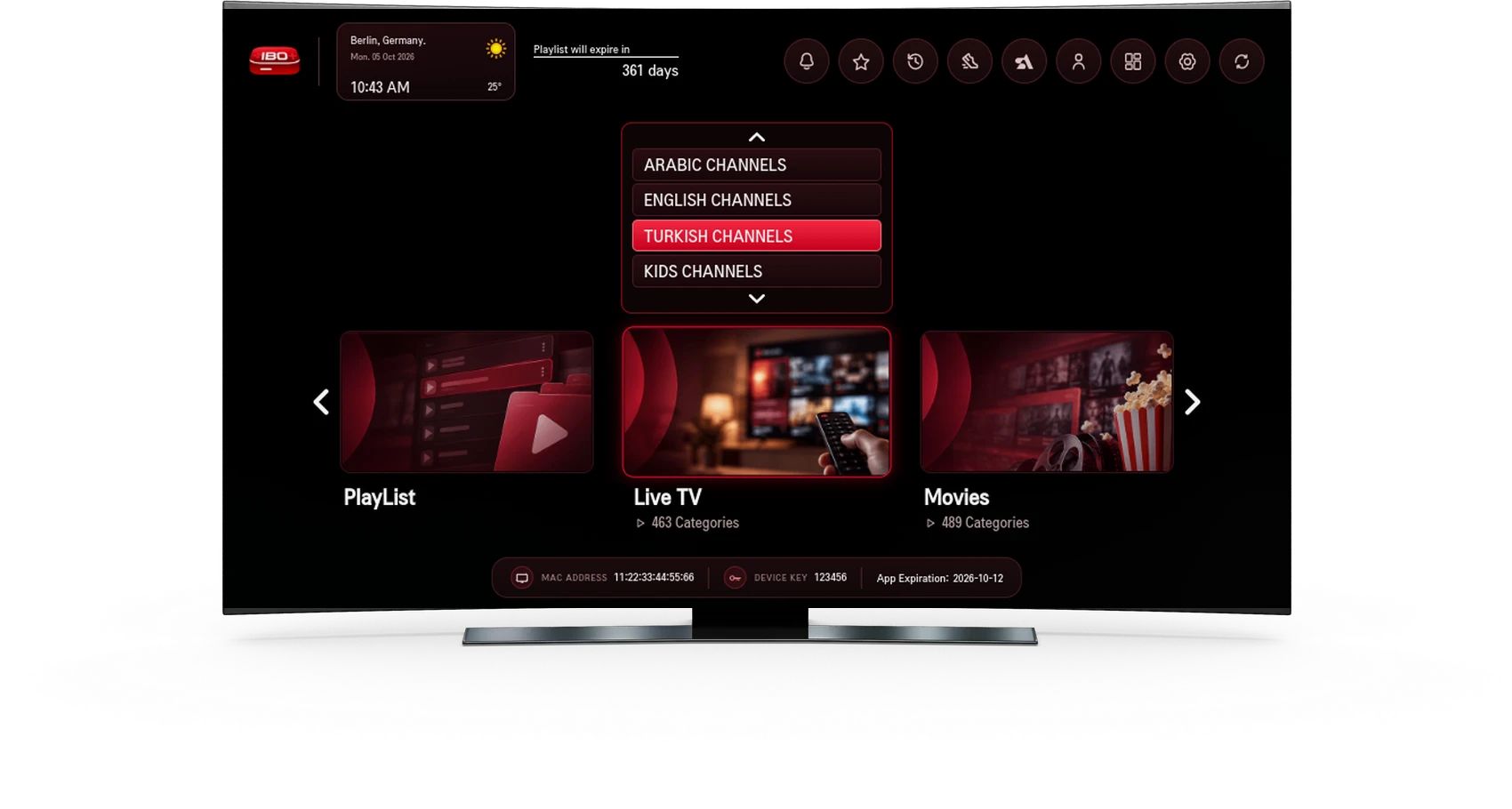
IBO STB Player Interface
The preview below shows an example of the player interface with playlist and media sections. Content shown in the preview is not supplied with an activation license. The interface and controls available can vary by device and application version.
Manage Your Own Playlist
The STBIBO playlist-management page asks for a MAC address, playlist URL and playlist name. Enter the details for your own device and lawful playlist, then follow the on-page verification steps. Other device-management routes may also ask for a Device Key; use the fields required by the route you selected.
Adding a playlist is separate from purchasing the app license. If a playlist expires or a stream is unavailable, contact your independent content provider. Activation cannot supply missing content or repair an inactive playlist.
For order assistance, contact the store identified on your payment confirmation and provide your order reference. Before paying, read the Terms of Online Sale and the conditions shown on the destination product page.